Concepts and Architecture
This page explains how Thalamus is put together: the node pipeline, the data model that flows through it, the capture-file format, and the tooling that turns recordings into analysis-ready data. It complements the Quick Start (which walks through using the program) and the Node Reference (which documents each node type).
Mental model
Think of a Thalamus session as a directed graph of nodes on one shared
nanosecond timeline. Producers generate data; consumers and transformers
subscribe to the producers whose data they need; and a STORAGE2 node writes
every message from the nodes it is subscribed to into the .tha capture log.
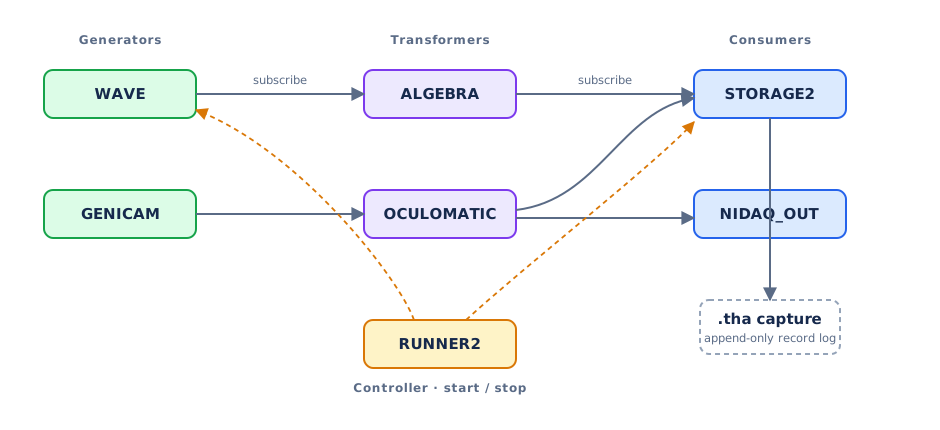
The node pipeline
A Thalamus session is a pipeline of nodes. Each node is a small, independently configurable unit, and every node plays one of four roles:
Generators produce data – hardware acquisition (NIDAQ, INTAN, SPIKEGLX, GENICAM, …) or software sources (WAVE, WALLCLOCK, PUPIL).
Consumers terminate data – recording it (STORAGE2), logging it (LOG), or driving an output device (NIDAQ_OUT, OPHANIM).
Transformers consume data and produce new data – analysis and mapping (OCULOMATIC, ALGEBRA, LUA, NORMALIZE, ARUCO, …).
Controllers coordinate the pipeline – starting and stopping groups of nodes (RUNNER, RUNNER2, TASK_CONTROLLER).
You build an experiment by adding nodes, setting each node’s type and properties, and subscribing consumers/transformers to the producers whose data they need. Most nodes have a small set of inline properties; nodes with richer configuration also provide a node widget that appears when the node is selected. See the Node Catalog for the full list of types.
Because nodes are decoupled and communicate over gRPC, a pipeline can also span machines: a REMOTE node proxies another instance’s stream, and a RUNNER2 node can start/stop nodes on remote instances.
The data model
All data is carried in a single message type, StorageRecord. Every record has a
node (the producing node’s name), a time (see below), and exactly one body
that determines the kind of data:
analog – time-series samples. An
AnalogResponseholds a flatdataarray, a list ofspansthat name each channel and mark its slice ofdata(begin/end), and asample_intervalsarray giving each channel’s sample period in nanoseconds. Integer-valued streams useint_data(32-bit signed) orulong_data(64-bit unsigned, for counters/timestamps and other large integer values);thalamus.record_reader2andthalamus.dataframeread all three.image – a video/camera frame, with raw bytes,
width,height, pixelformat(e.g.Gray,RGB,MPEG4), andframe_interval.text – a string message (log lines, event markers).
xsens – motion-capture pose data: body segments with position and quaternion rotation.
metadata – key/value pairs (string, integer, or decimal).
compressed – a compressed payload wrapping one of the above (used when analog or video compression is enabled).
This uniform model is why the same tools work across modalities, and why a single recording can interleave signals, video, markers, and motion on one timeline.
Time
Record timestamps are expressed in nanoseconds from a steady clock, not a Unix
epoch. The clock is monotonic relative to an arbitrary start point, which makes it
ideal for measuring intervals and latencies but means timestamps are not wall-clock
dates. To anchor a recording to absolute time, include a WALLCLOCK node. For an analog record, the time marks the moment of the
record’s last sample, so the time of every sample can be reconstructed from the
sample interval.
The capture-file format
A recording is a .tha capture file: a flat sequence of records, each written as
an 8-byte big-endian length prefix followed by the serialized StorageRecord
protobuf. A STORAGE2 node writes one record every time a node it is subscribed to
produces data, so the file is an interleaved, append-only log.
By convention the first record carries a metadata body with the recording
number (the Rec key), and a companion <file>.YYYYMMDD.R.json snapshot of the
configuration is written alongside the capture. See the Quick Start for an
annotated example of the records in a file.
Reading and converting recordings
Several bundled modules turn a .tha file into analysis-ready data:
python -m thalamus.record_reader2 FILE– iterate over and print raw records. In Python,thalamus.record_reader2.SimpleRecordReaderyieldsStorageRecordmessages (use it as a context manager).python -m thalamus.dataframe -n NODE -i FILE– export one node’s analog (or text) channels to CSV, Parquet, and other tabular formats.python -m thalamus.hydrate FILE– convert an entire capture into a single HDF5 file. For each analog channel it writes adatadataset of samples and areceiveddataset of per-record timing, from which exact sample times can be reconstructed.
The Examples page shows each of these end to end, and the
examples/ folder in the repository contains runnable scripts.
Persistence
Node configurations and window layouts can be saved and reloaded, so an experiment’s full setup is reproducible. When a node’s configuration must change in a backward-incompatible way, a new numbered node type is introduced (for example STORAGE → STORAGE2) so existing setups keep working.